
I spend so much time tinkering with my homelab setup, I thought I’d show it off a bit.
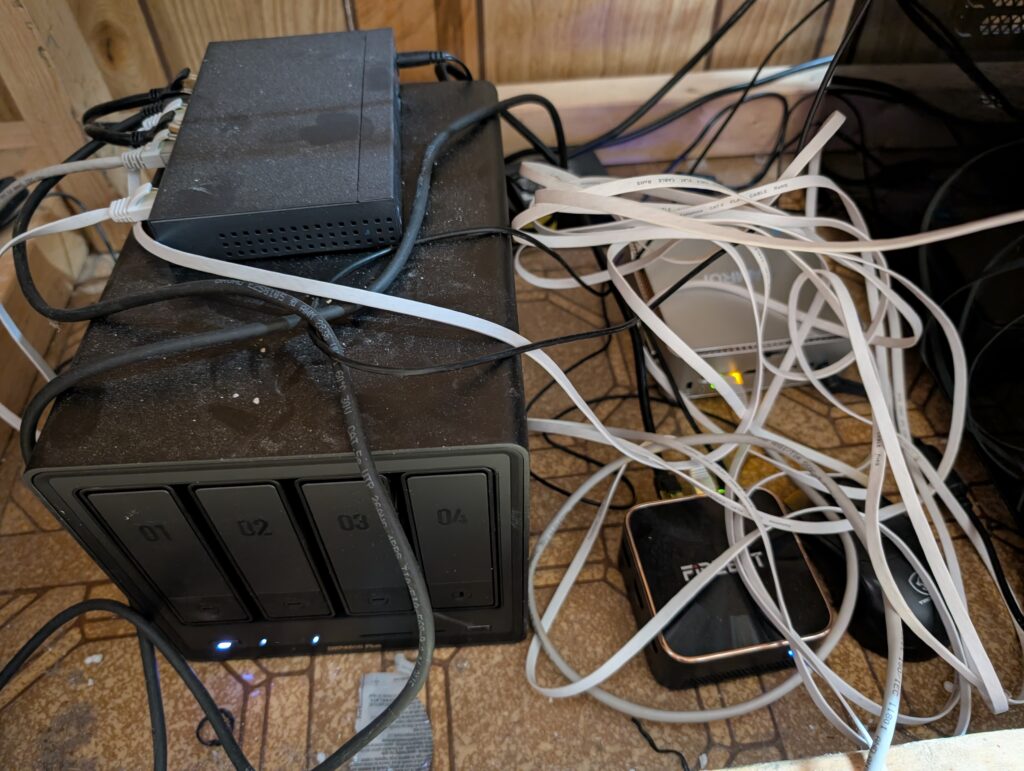
It may look like a mess, but it’s a well organized mess!
What we have here:
UGreen NAS
I have a Network Attached Storage (NAS) running TrueNAS Scale (the linux version of TrueNAS). It’s the big box with the four drive bays in the image; all four drive bays contain 3TB harddrives running in a RAID configuration.
The TrueNAS box is running several services through TrueNAS Apps:
- SyncThing: Syncs all directories from all devices running syncthing.
- Immich: https://memories.wheeli.ca For Family photos and videos
- Jellyfin: https://media.wheeli.ca A Media server for movies, TV, and music
- Postgres: A relational database (used primarily by my GoToSocial instance)
- Audiobookshelf: https://audio.wheeli.ca Media server for podcasts and audiobooks
Firebat Router
The mini pc that says Firebat on top is my router. One of the ethernet cables connects to the modem, the other connects to the switch. This box runs Proxmox and has the following LXCs and VMs running:
- OpnSense: My router with built in Ubound Ad Blocking DNS, OpenVPN VPN, and more
- GoToSocial: https://wheeli.social My GoToSocial social media server on the Fediverse
- Nginx Proxy Manager: a reverse proxy server
- VaultWarden: https://vault.wheeli.ca A password manager
- WordPress: https://brian.wheeli.ca This website you are reading right now
- Baikal: https://calendar.wheeli.ca CalDAV calendar server. I should replace this with Radicale
- MeTube: Youtube video downloader
Podman Server
The silver mini pc that says Kamrui on top is running Podman. It currently runs:
- Nothing! I just added this one last week and haven’t put anything on it yet
Gaming Rig
The big box to the right side. It has Bazzite (Linux geared for gaming) installed on it. It runs:
- Sunshine: A streaming system that lets me play games from this box anywhere I want
Bosgame Server
Not pictured, but it’s a mini pc that says Bosgame on top. It has a Ryzen 9 6000 series graphics processor and 64GB of shared DDR4 RAM (I got it for cheap just before the AI boom). I have experimented with AI stuff using it. I should try some of that again. I shouldn’t just let such a (nowadays) expensive box sit on a shelf doing nothing…
Xyxel Wifi Access Point
Not pictured. The wifi access point connects to the network and gives me wifi.